


My Blog for your Knowledge

We'll make sure your website works for you...

The Road to Web designing

Art Illustrations

Do you want to look great?

10 October 2011

14 Tips in Designing Impressive Dark Website Backgrounds


Websites have different designs as an aftermath of the creative minds of web designers. Indeed, their creativity could surpass the limits of one’s imagination for their outputs are always better than what we expect it to be. A website background plays a vital role and creates a great impact to the entire web design. Hence, one should be able to work well on the background as well on the other parts of the design.

There are so many ways on designing a website background but in this post, we will give you some valuable tips on how to make dark website backgrounds. Designing in dark is challenging for you have to consider a lot of things in order for the contents to be clear and readable. Dark websites are often used to showcase images, videos and others. In order for you to create a good dark web design, here are some tips for you.

1. Let the spotlight go to images, videos and others.

Let the spotlight go to http://image.naldzgraphics.net/2011/09, videos and others.
Image: blackberry
Dark website backgrounds are more effective when showcasing images like artworks,photography, motion pictures, products, and videos. Using it gives more emphasis to these elements and allows the user to have a clear look at them.

2. Choose the right color scheme.

 Choose the right color scheme
Image: joeylomanto
Colors play a vital role in your website especially if you work with a dark background. Make sure that the colors you use will make your design look more attractive. It should also be distinguished from the rest of the design. The color scheme you choose should complement each other and should jive with the website’s theme.

3. Use a single bold color and use it repeatedly.

You may also choose a single color- primary color that you will use in your site and then use it repeatedly in the design. It also works well and gives emphasis to key points of your website. If you think it looks dull, consider the example below.

4. Use reflections for a classy feel.

Use reflections for a classy fee
Image: mirieldesign
In a dark background, reflections are fascinating. It gives a good effect to the images you display. Reflections look best when used with a dark background especially if it is black.

5. Use gray and white only.

Use gray and white only
Image: joselmerino
You really don’t have to use many colors in your design. You can also try using the gray palette and your design will still look good. Some may think it looks dull but with the proper layout and usage of gray and white, the design will still be outstanding.

6. Use fonts that are readable.

Use fonts that are readable
Image: time2project
It is important for texts in your web design to be readable. After all, it is what your website is all about. Use fonts that are easy to read and not the fancy ones. Make sure also that you use the right color for your font. If you use a dark font, place an outline or use a light background for your text so that it will be visible despite your dark website background.

7. Make a contrasting background.

Make a contrasting background
Image: badex
Contrast is also important. Do that in your background for it will surely add a pleasing touch to your design. When we say contrast, it means that there are opposing elements in your design like light and dark colors. Play with contrast in your background and it will turn out greatly.

8. Take note of white spaces in your typography.

Consider kerning, leading, letter spacing and tracking in your text. You have to look into this to make sure that your texts are readable. White spaces in your letters are important. So, never take them for granted.

9. Try blending colors in your dark background.

Try blending colors in your dark background
Image: use19clothing
Instead of using plain dark website backgrounds, you may blend other colors with it. Of course, you have to stick with your color scheme. Use the colors from your color scheme to blend with the dark background. It will have a lighter effect to your design.

10. Use minimal contents.

Use minimal contents
Image: v1osvaldas
If you want to use more dark background, you can do that by using minimal graphics or text. It will look amazing for it seems like something has suddenly sprouted from the darkness. Try this technique to make your website unique.

11. Use color to draw attention to important points.

Use color to draw attention to important points.
Image: sklobovskaya
For dark designs, colors play a vital role. There are key points in your website. Use colors to emphasize them and to draw the reader’s attention to them. Make it easy for your readers to browse what is in your website.

12. Blend an image with the dark background.

Blend an image with the dark background
Image: two24studios
You may also use images in your background. Let it blend with the color and it will give a good effect. Just make sure that you will choose an image that suits the theme of your website.

13. Use glowing lights to add more visual appeal.

Use glowing lights to add more visual appeal.
Image: kavoon
Glowing lights and glowing effects look really great in a dark background. This makes an element radiate and will make your web design more attractive. Just do not use too much of it ‘coz it might spoil the design.

14. Use textures, patterns, brushes and other effects.

With your dark background, you may use some elements that could make your design look better. Textures, patterns, brushes and other effects will do well to add an appealing touch to the website.
Indeed, as seen in the examples above, dark website background looks good and could still be effective depending on how you make it. If you haven’t try designing a website using dark backgrounds, why don’t you try doing it and apply some tips that we have given you? For sure you’ll find it challenging yet fulfilling when you see a great output.

Author: Ebrian Acebedo

3 October 2011

New Windows 8 Features & Release Date


Windows, being one of the most used OS, brings great challenges for Microsoft to keep its users impressed in the next version of Windows.

Although Windows 7 has done exceptionally well since its release, Microsoft has been constantly working to make the next version of Windows a better one by further improving upon the existing features, and have added new impressive Windows 8 features along with a stunning UI.

Microsoft released the early version of Windows 8 on a prototype tablet last week. Those of you who would like to taste and experience the all new Windows 8, you can download the Developer Preview, which is currently in pre-beta version. The developer version shows off the current stage of the OS. It is available for free download, and comes in three different packages:
  • (1) 64-bit version – Only the OS
  • (2) 32-bit version – Only the OS
  • (3) 64-bit version with developer tools

Windows 8 features

Windows 8 offers a number of new Windows 8 features from its all new UI to Windows App Store and improvised security features. Here’s a list of new features and improvements which will arrive with Windows 8:

Support for both x86 PCs and ARM tablets

Windows 8 is the first edition of Windows which will work on both ARM based tablets and traditional x86 (as well as x32 and x64) PCs based on ARM processors from Intel and AMD.

“Support for ARM-based chipsets, touch, and sensors makes Windows 8 work beautifully on your choice of a full spectrum of devices, such as 10-inch slates with all-day battery life, ultra-lightweight laptops, and powerful all-in-ones with 27-inch high-definition screens,” Microsoft contends, in a Windows 8 Guide distributed with Windows Developer Preview
Windows To Go


The “Windows To Go” seems to be an exciting feature that basically allows Windows 8 to boot from a USB device (called as Live USB), including user’s programs, settings and files. The feature is designed to work with both USB 2.0 and USB 3.0, and on both legacy NIOS and UDFI firmware. However, Microsoft says that a user will not be able to “Hibernate” with this feature.

Windows 8“Windows To Go is a new feature in Windows 8 that enables enterprise administrators to create USB drives containing complete, managed Windows images that users can use to boot and run Windows on any Windows 7 or Windows 8 capable computer. Windows To Go makes it possible for employees to use a managed device whether they work from home, a client office or in a free seating environment. This session will discuss Windows To Go, its hardware requirements and building compatible and complementary software.”

Another interesting thing about this feature is that, if the USB drive is removed, Windows will automatically freeze, but will continue to operate if the USB drive is inserted back in the next 60 seconds after removal.
Windows Store
To compete with Apple, Windows has confirmed the introduction of a Windows Store, similar to Mac App Store, which allows users to browse through Windows applications, while developers can publish their Metro-style apps on Windows 8 devices.
Few days back, Microsoft gave a strategic view of its app store, and gave a quick demo on how it works. Microsoft revealed that the Windows App Store will be the only place where users can access the Metro-styled apps. Here’s a quick demo that shows how users will be able to buy their apps:


Windows 8 User Interface
Speaking about the UI, Windows 8 certainly has got a mind blowing interactive UI, which has been extensively redesigned to a “Metro-style” design, which shows the most important information to you, embodies simplicity, and gives you full control over it. The UI is designed to provide a fluid and intuitive interaction and navigation with touch, or a mouse and keyboard.
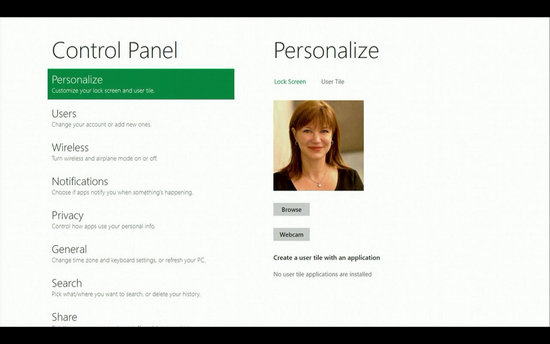
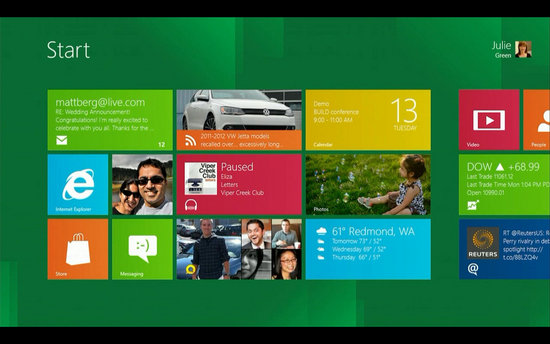
Julie Larson-Green, Corporate Vice President, Windows who stated: “Everything that’s great about Windows 7, is better in Windows 8,” gave a quick hands on look at the Windows 8 user-interface. Here are some of the screenshots she released:
Windows Logon Screen – Unlike the traditional way of entering a password to unlock the screen, Windows 8 can be unlocked by just tapping on the right areas of the screen.
Windows 8 Features
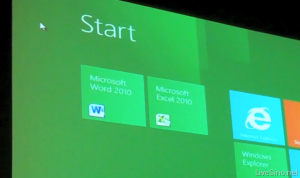
Windows 8 Start Screen – The Start screen is yet another impressive UI. The screen basically groups all your applications together, which you can easily drag and drop, or add new things.
Windows 8 Start Screen
Control Panel
Windows 8 Release Date
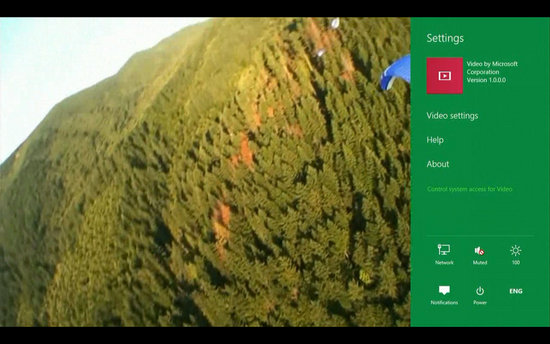
Playing Videos in Windows 8
Windows 8
Windows 8 Task Manager

Improved Windows Defender
The Windows Defender which was first released with Windows Vista is getting a security upgrade with the upcoming Windows 8. This would probably edge-our third-party antivirus and anti-malware programs. Windows Defender will become a full-fledged anti-malware solution for Windows 8. This will include protection against all types of malware such as virus, worms, trojans and rootkits.

Internet Explore 10
In addition to that, Windows Defender will provide real-time detection and protection from malware threats using a file system filter, and will interface with Windows secured boot, which is another security feature.
The developer preview of Windows 8 comes with a Metro version of Internet Explore (IE) 10. Since it is a preview version, it does not support any browser plugins and extension – including Adobe Flash and Microsoft Silverlight. However, it will feature full screen browsing mode by default, implements several new HTML5 capabilities, turbocharges HTML5 performance, and adds some security options for Web applications.
Windows 8 Minimum System Requirements

It is reported that Windows 8 is expected to have the same system requirements as Windows 7, and will run on existing PCs/laptops that run Windows 7. Here are the following minimum system requirements to run Windows 8:

Processor: 1GHz or faster 32-bit or 64-bit processor

RAM: 1GB (32-bit) or 2GB (64-bit)

HD Space: 16GB for 32-bit (or 20GB for 64-bit)

We can expect Windows 8 to be launched sometime in mid-late 2012, however, it’s too early to predict the Windows 8 release date, since it is still under development. Nevertheless, the only question that haunts each and every one of us – Will Windows 8 win the battle against Apple which it had lost several years back?

30 September 2011

16 Ways to Promote your Website

Many people spend their time maintaining their websites these days. Some even consider this as their primary source of income. There are so many websites which deals with various topics. It is amazing that no matter how many websites there is, there are always thousands of visitors each day. This goes to show that most people worldwide are really into this technology. It is now up to you on how you will increase your traffic and subscribers.
When one makes a blog or a website, the next thing to worry about is how to promote it and how to let other people know you exist. Well, it would be worthless if others couldn’t see what you worked hard for. So, that is why we have given some tips to help you promote your website.

1. Blogs.

 Blogs
Image: NVasion
Blogging is one effective way to reach other people. Lots of websites have a supporting blog in addition to the site which helps to increase the traffic of their websites. Blogs would be more effective if it has new contents every week. If you are making a blog, make sure you have planned the posts even before you have started making it. This is one way to ensure that your readers will continue following you.

2. Social Networking Sites.

Since using social networking sites is a trend today, make use of it to promote your site. You have lots of friends and followers in Facebook and Twitter who could regularly read your posts in your website. You can post updates about your website and invite them to view it. Readers could also bookmark your posts which is another great way to promote a site.

3. Networking.

Networking
Image: jonna_Asher
Connect with people and meet new ones whom you could talk about your field. They could not only help spread the word about your blog but they could be your friends who can give you professional advices when you need it. You can meet these people through social networking site and by joining online design communities and forums.

4. Contests.

You can have contests in your website. People will be interested to join them because they would love to win prizes whatever that could be. The more people who join it mean you had a successful activity. Aside from that, you can also join contests in other sites so that you can introduce yourself and your website.

5. Directories.

Directories
Image: ehow
Directories can be found in the web where people will search certain articles for they are kept in one website. All they have to do is search for it, you may want to be part of this directory to get backlinks and increase of traffic. Try posting your articles in sites like this.

6. Classifieds.

Classifieds
Image: haiderali
This is a common way to post your articles for free and reach millions of people. Like the directories, people can easily find you by searching on a topic which might be something you have made. Items are categorized making it easier for anyone to look for help.

7. Forums.

Forums
Image: koisnake
Join forums by answering questions, posting questions or commenting on posts. This will help you a lot in getting backlinks for you will include a link to your site after each comment. Make sure you will always give an intelligent and informative post so that people will be interested to know more about you from your website.

8. Banner and Text Link Advertising.

Banner and Text Link Advertising
Image: BuySellAds
Another way is using banner and text link advertisement. Making a banner could be a challenge for you are only given a limited amount of space. But if your banner looks interesting, then you’ll surely be successful through this. Meanwhile, text link ads are easier and cheaper to make. Contact related sites and ask them if you could post your ads. You can find these sites by searching for them in the internet. Or you may contact some sites which offer services for these ads so you can have a space on larger websites.

9. Portfolio Sites.

Portfolio Sites
Image: Behance
You may submit your work in sites that hosts portfolios. Put your link for every design you submit. You will not only invite new readers but this will also help you gain more clients especially if they like your design.

10. Tutorial Sites.

Another great way to get traffic is by submitting tutorials to tutorial sites. Other than letting them know you are good in the field, they will also check your website for more tutorials they can benefit from. Always place a link to your site whenever you submit a tutorial.

11. Link Baiting.

Link Baiting
Image: Sean MacEntee
Link baiting is when you post something that is bookmarked or blogged a lot. A good content of your post will be helpful to promote your site. If many people blog about it, share it or bookmark it, then there is a greater chance for more people to read it.

12. Email Marketing.

Email Marketing
Image: Aweber
To avoid being considered as a spammer, have an opt-in email form in your website where the visitors can sign up to receive updates from your website. Once they have signed up, you can start sending free tips or other freebies to them. You can even send them your email newsletter where they can find updates about your website.

13. Videos.

Videos
Image: RockNRoll200
Another popular way of promotion online is using videos which are viral. It is a good way to invite people to your site. Make an interesting video so that many will be eager to view it and end up visiting your site.

14. eBooks.

eBooks
Make an ebook with an interesting topic and sell it in the market. You can also give them for free if you want to for every new subscriber. This will also arise interest in others to subscribe to your website.

15. Print Advertising.

Print Advertising
Image: ronaldesign
This is quite expensive but would be effective if you have your own office in a certain area. You can send out flyers and posters to introduce your business. Also, do not forget to make a business card which is very important in marketing a business.

16. Oral Communication.

Word of Mouth
Image: ronaldesign
Now, this is surely an old fashioned yet very effective way of promotion. Tell everyone about your website. You can use your printed stuff to tell them about this and for sure, others will know about it. Without you knowing it, there are lots of people who visit your site because of word of mouth. Also, always bring with you your business card so that you can hand it to anyone you meet on the way.
There are so many ways to promote your website and you could use all of them or not. Promoting your website is a challenge but after all the work has been done, it will all be worth it. We hope we helped you through this post. If you have other points to share, we would appreciate it. Feel free to write in the comment section below for some other ideas on promoting a website.

Author: Kareen Liez

Apply to be a Chitika Publisher!
Follow on Buzz